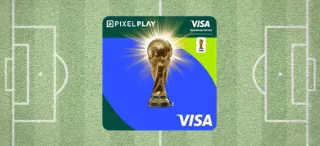
Step Into The Exclusive FIFA World Cup™ Experience

With FIFA World Cup 2026™ PIXEL Play Visa Credit Card

The Stars LOVE This Rockstar - PIXEL

Built different. Launched loud.

Build Your Own PIXEL

Not Just Moments. Unforgettable Experiences, All Unlocked.

Know More About The Card

Card Highlights

Features:

5% CASHBACK. ON BRANDS YOU PICK.​

  • Choose any 2 packs that match your spend:
  • Dining & Entertainment – BookMyShow, Zomato
  • Travel – MakeMyTrip, Uber
  • Grocery – Blinkit, Reliance Smart Bazaar
  • Electronics – Croma, Reliance Digital
  • Fashion – Nykaa, Myntra​

3% CASHBACK. KEEP IT GOING.​

  • On Amazon, Flipkart or PayZapp

1% CASHBACK. EVEN ON UPI.​

  • For PIXEL RuPay Credit Card

  • Pay in Parts:
    Convert your transactions and outstanding balance into low-cost EMI with flexible tenure, completely managed with yourPayZapp app
  • To know more detailed Terms & conditions click here

  • Exclusive Dining Privileges:
    Enjoy upto 10% off on all your restaurant bill payments via Swiggy Dineout across more than 20,000 restaurants. Offer valid only on payments done via Swiggy App. To know more, click here
  • Fuel Surcharge Waiver:
    1% fuel surcharge waiver at all fuel stations across India (on a minimum transaction of ₹400 and a maximum transaction of ₹5,000. Maximum waiver of ₹250 per statement cycle). 


Revolving Credit

Card Control via PayZapp

  • End to end Management via PayZapp
  • Track spends
  • Track and redeem rewards
  • Raise tickets In-app via help center
Card Management & Controls

PIXEL CashPoints

  • CashBack will be credited in the form of PIXEL CashPoints and can be easily managed under the rewards section of the PIXEL Homepage in Payzapp.​
  • Upon the accumulation of 1000 PIXEL CashPoints, they can be redeemed easily to the PayZapp Wallet and used to purchase your choice of brand vouchers within PayZapp digitally. 
  • PIXEL CashPoints are valid for 2 years from the date of accumulation.​
Fuel Surcharge Waiver

Statement & Repayments

  • You can easily view and download the digital statements in the PayZapp. ​
  • View the current outstanding on the card and make card repayment within the PIXEL Home page using payment methods like UPI, Debit Card, & NetBanking.
  • Repayment can also be made via third party (BBPS) apps
Welcome Renwal Bonus

Steps to Activate

  • Activate your card within 37 days of issuance, or it will be closed in accordance with regulatory guidelines.​
    Option 1:Activate your PIXEL by clicking the link (https://pixel.hdfcbank.com/pixel/apps/#/extcardactivation) on mobile.
    Option 2: Download HDFC Bank PayZapp from Google Play or Apple App Store.
  • Download HDFC Bank PayZapp from Google Play or Apple App Store.
  • Sign up using your mobile number (ensure it matches the one used for your PIXEL Card application)
  • After PayZapp registration is completed, click on the " Activate your card" banner present on the PayZapp homepage
  • Click on "Activate & start customizing" to activate your card. Your PIXEL Play Card is instantly activated
  • Choose your card design – Limited Edition FIFA World Cup 2026TM PIXEL Play Visa Credit Card, LIT, POP, or ICE ​
  • Choose any two brand packs that fit your lifestyle (Dining & Entertainment, Fashion, Electronics, Travel, Grocery, etc.), and choose any 1 Ecommerce Platform on which you want to earn 3% Cashback (Amazon, PayZapp or Flipkart )
  • Set your card PIN and card control
  • Your PIXEL is now ready for shopping


Additional Features

Steps to set UPI PIN

  • Open PayZapp and tap on "View PIXEL Home" on the home screen
  • Navigate to Settings > "Set RuPay UPI"
  • Verify your OTP, set your card PIN, and you're all set!
pd-benefit-feature-1

Enable Scan & Pay

Link Your HDFC Bank PIXEL RuPay Credit Card for Scan & Pay:

  • Open PayZapp and tap the menu bar on the top left corner.
  • Go to "UPI Accounts" under Account Management.
  • Under Credit Cards, tap "Add New" and select HDFC Bank Credit Card.
  • Enter the last 6 digits of your card and its expiry date, then proceed.
  • Verify with OTP, enter your credit card PIN, and create your UPI PIN.
  • Done! Your card is now linked for Scan & Pay transactions.
  • Enable Scan & Pay payments for third party apps

To know more about PIXEL RuPay Credit Card, click here

Revolving Credit

Enable Scan & Pay for Third-Party Apps

Enable Scan & Pay on Third-Party Apps in a few steps:

  • Open the app and go to Payment Methods.
  • Select "Add RuPay Credit Card on UPI", choose HDFC Bank, and continue.
  • When the "Add HDFC Bank RuPay Credit Card" prompt appears, tap Continue.
  • Your PIXEL RuPay Credit Card is now linked and ready for Scan & Pay transactions.
Revolving Credit

Servicing via Help Center

  • You can easily refer to the FAQs for every section by clicking on “?” in the app screen to view and get answers to your questions. ​
  • You can also raise a query ticket within the app if you need more help by clicking “Raise a Ticket”, and the service team will respond to your query in the app.​
  • How to Raise a Ticket?
    1. Tap "?" on the PIXEL Play Credit Card Home Page.
    2. Choose the relevant category and query.
    3. If your query isn’t listed, select "My query is not listed" to raise a ticket.
Revolving Credit

Contactless Payment

  • Swipe to Pay:​
    The PIXEL Play Credit Card enables seamless e-commerce and UPI transactions via the HDFC Bank PayZapp app. Enjoy fast, secure payments without the need for OTPs sent via SMS or a UPI PIN.​
  • Tap & Pay:
    PIXEL Play Credit Card has enabled contactless payments to facilitate fast, convenient and secure payments at retail outlets. Just tap once with either your phone or physical card and make hassle free offline payments.
  • Scan & Pay:​
    With the PIXEL RuPay Credit Card, you can pay merchants by simply scanning a UPI QR code using any third-party app—making payments quick and convenient.​
Revolving Credit

Fees & Charges

  • Limited Time Offer: Own the FIFA World Cup 2026™ PIXEL Play Visa Credit Card, lifetime free. No joining fee. No renewal fee. Just pure PIXEL.​
Revolving Credit

Most Important Terms and Conditions

Revolving Credit

Where to apply for the PIXEL Play Credit Card 

Click here to apply for the Limited Edition FIFA World Cup 2026TM PIXEL Play Visa Credit Card

You can also apply for a PIXEL Play Credit Card via: 

Ways to Apply

Important Notes

Note:

A. Upon approval of your PIXEL Credit Card, please complete the card setup process in PayZapp to ensure timely delivery. This step is compulsory and includes choosing your card design (Limited Edition FIFA World Cup 2026TM PIXEL Play Visa Credit Card , LIT, POP, ICE), choosing your offer pack (5% or 3% cashback) choice of brands, and the billing cycle date.

B. In case you do not select the credit card design within 3 days of approval, you'll be issued a digital RuPay card, while the bank will dispatch a default VISA network credit card with the ICE design to your registered postal address as part of the standard issuance process.

​​​​​​​C. Customers applying for PIXEL Credit Card via PayZapp will get the option to choose network(Visa/RuPay/Both). This option will be available up to 3 days from the day of card application approval, post that, you'll be issued with both RuPay & Visa network cards with RuPay as a Digital Card and Visa as a physical plastic card to your registered postal address with ICE colour card design as a standard issuance process. Please note a single consolidated PIXEL statement will be generated for both the cards together every month.

D. Limited Edition FIFA World Cup 2026TM PIXEL Play Visa Credit Card is only available on Visa network. ​

Ways to Apply

Frequently Asked Questions

Here is how you can apply for the new FIFA World Cup 2026™ PIXEL Play Visa Credit Card
 

  • Existing PIXEL Play customers can change your card design by following below steps:
    Log into PayZapp > Visit PIXEL Homepage > Card settings > Personalise > Change app theme > Select FIFA Card
  • Don’t have a PIXEL Play? Click here to apply now.

T&C Apply.

Both existing FIFA World Cup 2026™ PIXEL Play Visa Credit Card customers and new customers on approval of a FIFA World Cup 2026™ PIXEL Play Visa Credit Card, can apply for the new FIFA World Cup 2026™ PIXEL Play Visa Credit Card.

Existing customers can change or personalize their card design through the PIXEL app using the below steps:

  • Log in to the PIXEL app (PayZapp)
  • Go to PIXEL Home Page
  • Tap the Settings icon
  • Open the Personalize section >> Change App Theme
  • In Select your App theme, select the FIFA Card
  • Place an order for a physical card
  • Choose the delivery address
  • Tap "Deliver Here" to confirm

Yes. Existing PIXEL Play cardholders will be charged ₹100 + GST for the FIFA theme change.

New customers who have been approved for a FIFA World Cup 2026™ PIXEL Play Visa Credit Card can select the FIFA card design during the DIY (Do It Yourself) card theme selection process post card issuance.

No. This offer is only applicable for HDFC Bank PIXEL Play Visa Cardholders.

If you apply for the new FIFA card design for your HDFC Bank PIXEL Play Visa Credit Card, your HDFC Bank PIXEL Play RuPay credit card will automatically switch to the Ice Theme.

Yes. Opting for the new FIFA World Cup 2026™ PIXEL Play Visa Credit Card will re-issue new Credit Card Number.

PIXEL Play Credit Card offers 5% Cashback on selected brand, and 3% Cashback on choice of Ecommerce Platform. Customers are also eligible for 1% CashBack on all transactions, 5% on SmartBuy purchases, and 1% on UPI spends (for the RuPay variant).

Yes, you can instantly convert transactions into EMIs via PayZapp, choosing from flexible tenure options.

Customers can Tap & Pay at stores, Swipe to Pay online, or Scan & Pay via UPI (for the RuPay variant). Mobile Tap & Pay is also available for PIXEL VISA cardholders, who hold NFC enabled Android mobile phones

Get Your Lifetime Free FIFA World Cup 2026™ PIXEL Play Visa Credit Card Now!